Many enterprise business processes involve a level of complexity that cannot be fully managed with traditional rule-based workflows alone. AI workflow automation helps organizations streamline these processes while supporting human decision-making at scale.
We’ve spoken to experts to create a guide for anyone evaluating AI workflow automation platforms or looking to deploy an AI workflow builder in an organization. We cover the underlying technologies, use cases, and governance practices you will need to successfully implement AI workflow automation.
Key Takeaways
- Many organizations invest more in AI capabilities than they do in the quality of the data those AI systems rely on. However, the success of any AI workflow automation depends almost largely on data readiness. Any AI initiative requires up-to-date and context-rich data.
- AI workflows should minimize manual effort by presenting useful results within one or two interactions. Rather than adding more features or capabilities, prioritize minimizing time-to-first-value for employees. The more quickly users experience value from the AI automation, the more likely they will be to use it over time.
- Agentic AI is most effective when it complements, rather than replaces, existing automation. A phased approach provides a more scalable path to enterprise adoption.
- AI workflow automation introduces a new governance challenge; unlike traditional automation, which often fails with a visible error, AI can produce plausible but incorrect outputs without signaling a problem. As a result, organizations must direct human resources toward validating outputs.
What Is AI Workflow Automation?
AI workflow automation is the use of artificial intelligence (AI) to automate business processes. Unlike traditional automation, which follows fixed rules, AI workflow automation involves workflows that can interpret data, use context to make decisions, and adapt their actions. Team members remain involved whenever review, approval, or human judgment is required.
How AI Workflow Automation Differs From Traditional Automation
The main difference between traditional and AI workflow automation is that traditional automation follows instructions, while AI workflow automation interprets context and information.
Traditional workflow automation relies on predefined rules to move work from one step to the next. For example, an expense report might be automatically sent to a manager once the total expense amount exceeds a set level.
AI workflow automation, on the other hand, adds the ability to interpret context and support decisions when a process cannot be reduced to simple “if-then” logic. It can also work with unstructured information, such as contracts, images, meeting notes, and emails. For example, an automation could analyze the contents of an incoming customer email, determine the request’s urgency and intent, route it to the right team, and draft a suggested response.
Here is an overview of the differences between traditional and AI workflow automation.
Traditional Workflow Automation… | AI Workflow Automation… |
Follows predefined rules and conditions | Uses models to interpret context and select actions |
Works best with predictable, structured inputs | Can process text, documents, images, and other unstructured inputs |
Requires rules to be manually updated | Can use patterns, feedback, or updated model outputs to improve decisions |
Sends unexpected cases to a person or error queue | Can classify some exceptions and route them appropriately |
Produces largely deterministic results (i.e. the same input always yields the exact same output) | May produce probabilistic results (i.e. outcomes based on likelihood rather than fixed rules) |
These two approaches are not mutually exclusive. Most teams use them together. Learn more about how best to approach workflow automation in this guide.
Core Technologies Behind AI Workflows
AI workflows consist of several types of technology that help software understand information, make decisions, and take action.
Here are the core technologies behind AI workflows:
- Machine Learning and Predictive Models: These systems find patterns in data and use them to make predictions. For example, they can flag projects that are at risk of delay or identify customer requests that may be urgent.
- Natural Language Processing (NLP): NLP helps software understand and work with human language. It can identify the topic of an email, extract key details from a document, translate text, or detect whether a message is positive or negative.
- Large Language Models (LLMs): LLMs can understand and generate text. Tools such as ChatGPT and Claude use LLMs to summarize documents, draft content, and interpret complex requests.
- Generative AI: Generative AI creates new content, including text, images, audio, video, and code. LLMs are one type of generative AI because they generate text.
- Workflow Orchestration and Integrations: These technologies connect AI tools to the apps, systems, and data that a business already uses. They can also trigger other automation tools, including robotic process automation (RPA) bots, to complete predefined actions, such as creating a task from a form submission or requesting approval.
- AI Agents: Businesses can connect LLM-powered AI agents to workflows. These agents can interpret a goal, decide which steps to take, and use integrations to carry out actions. For example, an agent might review a request, decide which team should handle it, gather information from several systems, and draft a response for approval.

“A chatbot responds when you prompt it,” says Lauren Stein, a fractional chief of staff who advises early-stage companies on startup growth and AI transformation. “An AI agent is more proactive: it can monitor an event, begin a workflow, and carry out steps without waiting for a person to prompt it each time.”
What Are Agentic Workflows — and How Do They Differ From RPA?
Agentic workflows use AI agents to work toward a goal across multiple steps. Unlike robotic process automation (RPA), which follows a fixed set of rules and steps, agentic workflows can adjust their actions based on context, new information, and the results of previous steps.
For example, an RPA bot might copy approved data from one system to another. An AI agent could review a more complex request, gather missing information, decide where it should go, and send it to the appropriate person for approval.

“The old model handled the 80 percent of cases that look alike,” says Meryll Dindin, VP of Product and Engineering at Parallel Learning. “Agents finally take on the 20 percent that used to bounce straight back to a person.”
The two technologies can also work together. An AI agent may interpret a request and decide what needs to happen, while RPA completes a routine action.
How AI Agents Make Decisions
Although AI agents appear to make decisions, they do not use human judgment or understand consequences in the same way people do. Instead, they analyze the information available to them and use an LLM, business rules, and predefined instructions to determine how to appropriately act next. They can then use connected tools to carry out that action and either continue the workflow or ask a person to step in.
“Traditional automation follows a path you define up front,” says Dindin. “Agentic workflows reason through ambiguity instead of breaking when reality no longer matches the flowchart.”
For example, an AI agent handling a customer request might read the message, check the customer’s account, identify the issue, and draft a response. If the request reaches a point that requires approval or falls outside the agent’s permitted actions, it can pause the workflow and send the case to a person for review.
Why Enterprise Teams Are Moving From RPA to Agentic Automation
Enterprise teams are turning to agentic automation because many business processes are too variable to manage with fixed rules alone. Robotic process automation (RPA) works well when a task follows the same steps every time, but it can struggle when a workflow involves unstructured information or exceptions.
Agentic workflows can take on more of that variable work. This makes them useful for processes that span several tools or departments and would otherwise require frequent human handoffs.
Interest in agentic automation is high, but enterprise-wide adoption is still developing. In a 2025 IBM Institute for Business Value survey, researchers found that 86 percent of surveyed operations executives expected AI agents to improve process automation and workflow reinvention by 2027.
How AI Workflow Automation Works
At a high level, AI workflow automation follows the same basic pattern. First, something triggers the workflow. Next, the AI gathers the information it needs and decides what action to take. Finally, it either completes the task or routes it to the appropriate person based on preset approval controls.
While every workflow is different, most follow this same sequence of steps:
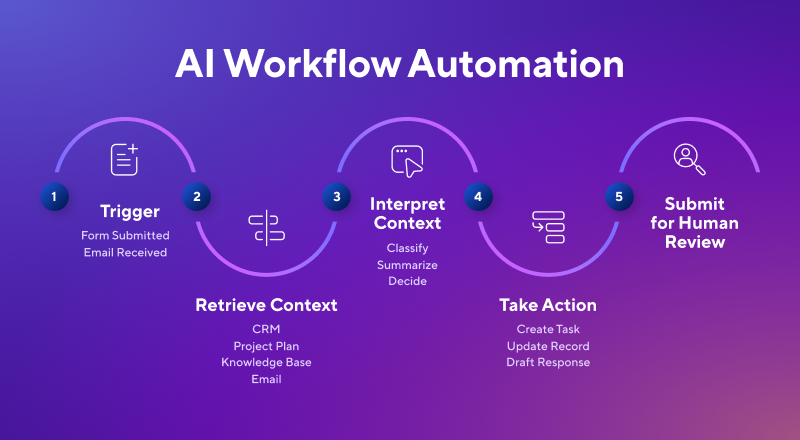
Triggers, Decisions, and Actions
An AI workflow begins with a trigger, such as a submitted form, an incoming email, or a change in project status. The workflow then retrieves relevant information from connected systems, such as a CRM or project management platform. Using that context, along with its instructions and business rules, the AI determines the next action. That action could include drafting a response, updating a record, or generating a report.
Human Oversight and Approval Controls
Enterprise AI workflows use approval controls to determine when a person must review or authorize an action. These safeguards help organizations balance speed with accuracy and accountability.
“A traditional automation fails loudly and throws an error you can see, while an agent fails quietly and confidently, handing you a plausible wrong answer with nothing flagged,” says Dindin. “The job moves from checking that it ran to checking that it was right.”
“AI can get you 95 percent of the way there, which takes a huge amount of work off people’s plates. But it still needs human review to make sure the final output is accurate, appropriate, and sounds like the organization.”
–Lauren Stein, fractional chief of staff
For example, an AI agent may be able to automatically categorize support requests or draft project updates, but it may not be able to issue a large refund, change a budget, update sensitive employee data, or send external communication without approval. Organizations can also set guardrails such as role-based permissions, spending thresholds, confidence requirements, and automatic escalation for unusual or high-risk requests.
“I would not let an AI agent publish content, contact a customer, or send something to a partner without a person reviewing it first,” says Stein. “The technology helps teams move much faster, but humans still need to handle that final layer of judgment.”
How AI Learns From Your Existing Workflow Data
AI workflow platforms do not typically “learn” from workflow data in the same way a person learns from experience. Instead, they use the data and context available to understand a request and choose the next action. As organizations connect more relevant workflow data, the AI has richer context for each decision. It will then produce more relevant recommendations and actions.
Examples of context include CRM records, project plans, emails, support tickets, knowledge bases, or company policies. For example, an AI workflow handling a support request might review the customer’s account, previous conversations, and product documentation before drafting a response for review.
Most platforms do not automatically improve after every task. Teams improve performance over time by refining instructions, updating workflows, connecting better data sources, and incorporating user feedback. See the Smartsheet MCP prompt library for examples of prompts that support common project management and workflow automation tasks.
Key Benefits of AI Workflow Automation for Enterprise Teams
The key benefits of AI workflow automation for enterprise teams include less manual coordination, faster work across connected systems, and more consistent processes at scale. AI workflow automation can speed up routine tasks like routing information and approvals, giving employees more time for work that requires judgment, collaboration, and customer interaction.
Reducing Manual Handoffs and Status Chasing
AI workflow automation reduces the need for employees to manually route work, follow up on approvals, or update statuses. It can assign tasks, send notifications, update records, and more based on predefined rules and real-time context.
For example, when a team member submits a project request, the workflow can identify the appropriate owner, gather supporting information, send approval requests, and update the project plan automatically. This allows the team to spend less time coordinating and tasks are less likely to drop. The result is overall faster execution.
Coordinating Work Across Systems
Enterprise work rarely happens in a single application. Instead of having employees copy information between systems or switching between applications, AI workflow automation connects information and actions across the tools teams already use. These might include CRM platforms, project management software, collaboration apps, or document repositories.
For example, closing a sales opportunity in a CRM could generate a project, notify the implementation team, create onboarding tasks, and update reporting dashboards without requiring manual coordination.
These kinds of applications are one of the greatest areas of opportunity in enterprise AI. Individual systems such as Salesforce or ServiceNow may have AI within them, but businesses still have to work across multiple systems of record. The ability to understand what happens across the gaps between those systems is where workflow intelligence becomes particularly valuable.
By reducing disconnected processes and duplicate work, organizations can move information more efficiently while giving employees a more complete view of the work in progress. Plus, with low-code and no-code workflow builders, teams can configure many of these integrations without custom development.
Learn more about intelligent work management and Smartsheet AI features.
Improving Consistency and Governance at Scale
AI workflow automation helps organizations apply the same rules, approval paths, and operating standards across teams. Instead of relying on employees to interpret each request independently, workflows can standardize how work is categorized, routed, documented, and escalated.
This consistency becomes especially important as AI expands across an enterprise. In McKinsey’s 2025 State of AI report, researchers found that 57 percent of organizations using AI fully centralize risk and compliance, while 46 percent fully centralize data governance for AI — making these the two most centralized elements of AI deployment.
It is important to note, however, that AI workflow automation comes with risks. Standardization must be paired with ongoing monitoring. Otherwise, a flawed rule or AI output might be applied consistently at scale.
Challenges and Considerations for Enterprise Adoption
The biggest challenges to enterprise adoption of AI workflow automation include preparing AI-ready data, managing organizational change, establishing governance and compliance controls, and redesigning workflows to scale beyond pilot projects. Organizations that consider these operational and technical foundations early are more likely to achieve successful adoption and see long-term value.
Data Readiness Is the Most Common Barrier
AI workflow automation is only as effective as the data and systems it relies on. “Companies often focus on bringing in AI tools before they have the right foundation in place,” says Stein. “If the data is disorganized or the systems do not connect properly, putting an agent on top will not solve the problem.”
Many organizations have not yet learned this lesson. Gartner predicts that through 2026, organizations will abandon 60 percent of AI projects that are not supported by AI-ready data. This finding is consistent with Dindin’s experience. “Most teams overinvest in the agent and underinvest in the data beneath it,” he says. “An agent is only as good as the context it can reach.”
Preparing for AI workflow automation should begin with improving data quality and creating systems for collecting and maintaining that data.
Change Management Drives Adoption
Employees are more likely to embrace AI workflow automation when they understand how it will affect their work. When organizations introduce AI without explaining its role, workers may worry about job security, changes to their responsibilities, or how AI-generated decisions will be used. Those concerns can slow adoption, even when the technology is capable of improving productivity.
Change management helps organizations address that uncertainty before it turns into resistance. Leaders should explain which tasks AI will automate, where employees will remain responsible, and how roles may evolve. “Companies should not tell employees that AI will do the work for them,” recommends Stein. “They should explain that it will work with them. The goal is augmentation, not simply outsourcing.”
The World Economic Forum’s Future of Jobs Report 2025 found that many employers expect AI to reshape jobs and increase demand for new skills, underscoring the importance of reskilling and workforce transition as AI adoption expands. Organizations are most likely to achieve lasting adoption of AI workflow automation when they communicate transparently, conduct role-specific training for employees, and offer employees opportunities to develop new skills.
Governance and Compliance Risk
AI workflow automation can help organizations move faster, but it also introduces new responsibilities around governance and managing compliance risk. Workflows that can access sensitive data — or that make decisions affecting customers or employees — require governance controls, especially at the enterprise level.
In their 2024 year-end report on enterprise generative AI, Deloitte found that regulation and risk had become a leading barrier to generative AI development and deployment. The share of organizations reporting concerns about regulation and risk rose from 28% to 38% over the course of the year. Rather than suggesting organizations should slow AI adoption, this trend underscores the importance of building governance into AI initiatives from the outset.
The first step is to understand the level of risk associated with each workflow that the organization wants to automate with AI. There should be formal policies in place for data access, user permissions, audit logging, vendor management, and regulatory compliance before deploying any AI tool. Higher-risk workflows may require additional safeguards, such as human review, or stricter access controls.
Scaling AI Through Workflow Design
Many organizations see promising results from their first AI pilot but struggle to scale those tools successfully across the business. McKinsey found that only about one-third of organizations were scaling AI initiatives across the enterprise. In their 2026 report, Deloitte similarly found that although sanctioned employee access to AI increased substantially in 2025, fewer than 60 percent of employees with access used those tools in their daily workflows.
For many enterprises, scaling requires more than deploying AI to additional teams. It also requires redesigning workflows so AI becomes integrated with teams and systems rather than functioning as an isolated productivity tool.
Much of how a business actually operates sits in the gaps between its systems of record. AI embedded within individual applications can improve productivity inside those systems, but organizations can often realize greater business value when AI supports cross-functional workflows that span them.
Workflow design is equally important from the employee’s perspective. “AI workflows get adopted when the end user can reach value in one or two steps,” says Stein. “If people have to do too much work before they see a useful result, the workflow will be abandoned. That work has to happen before the workflow reaches the user. By the time it is deployed, it should be simple enough that someone can get value in one or two steps.”
Ultimately, scaling AI is less about deploying more models, and more about redesigning how work gets done.
High-Impact AI Workflow Automation Use Cases for Enterprise Teams
Enterprise teams use AI workflow automation to streamline project management, IT operations, marketing, customer support, finance, HR, and other cross-functional business processes. Common use cases include routing work, generating summaries, coordinating approvals, updating records across systems, and reducing manual administrative tasks.
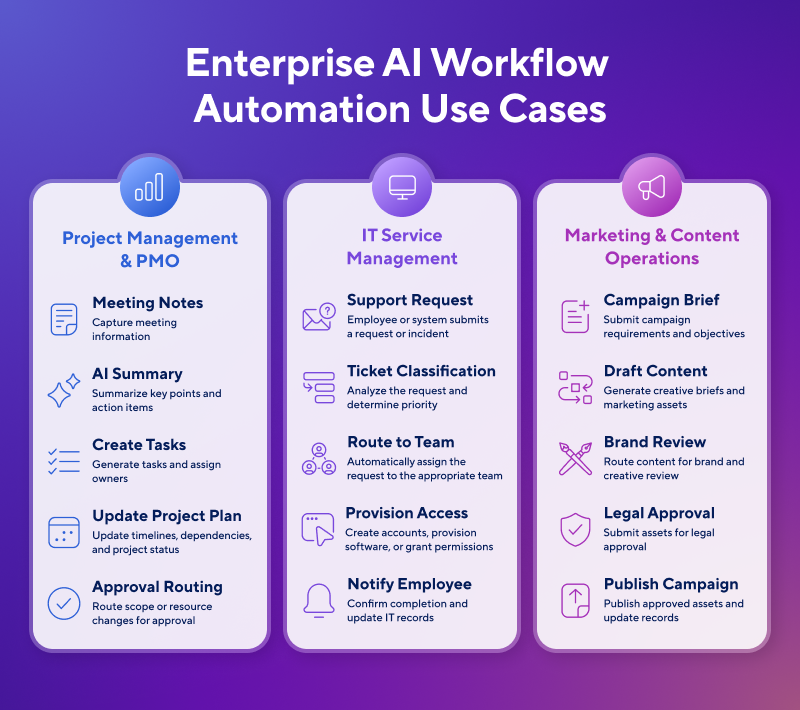
The following examples illustrate some of the most common enterprise AI workflow automation use cases and how they can improve coordination and execution. You can also learn more about AI for project management.
Project Management and PMO
Project management teams use AI workflow automation to reduce manual coordination and keep work moving across people, projects, and systems.
Here are some common AI workflow automation use cases:
- Summarize project status updates from meetings, emails, and collaboration tools
- Identify schedule risks, blocked tasks, and overdue work
- Generate executive status reports and project summaries
- Create tasks and assign owners from meeting notes or action items
- Update project plans and synchronize information across connected business systems
Example Workflow: After a weekly project meeting, AI summarizes the discussion, identifies new action items, creates tasks for each owner, updates the project plan, drafts a status report for leadership, and routes any budget or scope changes to the appropriate approver. Once approvals are complete, the AI workflow notifies stakeholders automatically and updates project records.
Discover how AI project management differs from, and works with, traditional project management methods, and find the right AI project management software for your organization.
IT Service Management and Operations
IT teams use AI workflow automation to improve service delivery, reduce manual ticket handling, and accelerate routine operational processes.
These example use cases demonstrate how IT and operations teams might use automated AI workflows:
- Classify, prioritize, and route incoming service requests
- Summarize incident details and recommend troubleshooting steps
- Automate employee onboarding and offboarding tasks
- Coordinate software provisioning and access requests
- Generate documentation from resolved incidents and support tickets
- Route change requests and escalations through approval workflows
Example Workflow: A new employee joins the company and submits an onboarding request. AI verifies the request, creates onboarding tasks, provisions standard software and system access, routes any elevated permission requests to IT managers for approval, notifies the employee as each step is completed, and updates records.
Marketing and Content Operations
Marketing teams use AI workflow automation to streamline campaign planning, content production, and creative collaboration. “An AI agent can turn meeting notes, engineering specifications, and product documents into draft sales materials, customer-success resources, and FAQs,” says Stein. “Instead of spending weeks creating one asset, the team can review and refine several in a much shorter period.”
Here are other use cases for AI workflow automation in marketing and content operations:
- Generate creative briefs, campaign plans, and content outlines
- Route content and creative assets through review and approval workflows
- Summarize reviewer feedback and recommend revisions
- Repurpose approved content for different channels and audiences
- Schedule content for publishing and update campaign records across connected marketing systems
Example Workflow: A marketing manager submits a campaign brief for a new product launch. AI drafts the project plan and creative brief, assigns work to writers and designers, routes content through legal and brand reviews, summarizes reviewer feedback for the content team, schedules approved assets for publication, and updates project status in the campaign dashboard.
What to Look for in AI Workflow Automation Platforms
When evaluating an enterprise AI workflow automation platform, organizations should look for enterprise-grade security and governance, low-code accessibility with developer customization, integrations with existing business systems, and workflow design and AI capabilities. The right platform should fit the organization’s workflows, data, and long-term automation strategy.
Discover how workflow automation software can help promote productivity within your organization.
Here are the top factors to keep in mind when selecting an AI workflow automation solution for your organization:
1. Enterprise-Grade Security and Governance
Enterprise AI workflow automation platforms often process sensitive business information, including customer data, financial records, and proprietary documents. Before selecting an AI workflow automation platform, organizations need to verify that it meets their security and governance requirements.
“Before I evaluate what an AI tool can do, I look at whether it passes the security test,” says Stein. “I review its security documentation, data practices, and controls. If the vendor has not done that foundational work, I do not bring the tool into the business.”
Look for features such as role-based access controls, encryption, audit logs, compliance certifications, data retention controls, and administrative oversight to help ensure AI workflows align with the organization’s policies and regulatory obligations.
2. Low-Code Accessibility And Developer Customization
Both business users and developers should be able to use the AI workflow automation platform and automate workflows. Low-code tools allow nontechnical users to build and manage workflows through visual interfaces, while pro-code capabilities enable developers to extend workflows with custom integrations, APIs, business logic, and specialized applications. The goal is to help organizations scale automation without creating bottlenecks between business teams and IT.
When evaluating a platform, look for visual workflow builders that make it easy to automate common processes. The most effective low-code platforms allow organizations to balance speed, governance, and extensibility — or the ability to expand or customize a software platform beyond its built-in features — as requirements evolve.
3. Integration Ecosystem and Scalability
The ability to connect with existing business systems is one of the most important considerations when evaluating an AI workflow automation platform. That includes project management tools, CRM and ERP platforms, collaboration software, document repositories, identity systems, and industry-specific applications.
The platform should support growing workflow volume, additional users and departments, centralized administration, usage monitoring, and consistent governance as adoption expands. When interviewing a vendor, confirm that workflows can be reused, standardized, and managed across the enterprise without creating unnecessary complexity or losing visibility into how automated decisions are made.
The strongest platforms make it possible to start with a focused use case and expand over time without rebuilding the underlying workflow architecture.
4. Workflow Design and AI Capabilities
Before comparing AI workflow automation platforms, organizations should identify the business processes they want to improve. Mapping how work moves across people, systems, and decisions helps teams prioritize high-value use cases and determine whether a platform can support the complexity of their workflows.
Self-awareness and self-knowledge of the use case are both important. Organizations should understand and map their own workflows before evaluating vendors, then consider whether a platform’s workflow capabilities, data architecture, and integration ecosystem align with their specific business processes and goals.
Beyond individual AI features, evaluate how the platform orchestrates end-to-end workflows. Look for capabilities such as conditional logic, exception handling, and AI-powered decision support. The platform should also be able to automate workflows across multiple business systems rather than within a single application.
Getting Started With AI Workflow Automation
To get started with AI workflow automation, first identify a well-defined business process that involves repetitive, manual work and measurable outcomes. Next, map the existing workflow, assess data quality, and pilot the AI in a low-risk use case. Measure results against business goals, and refine the workflow before expanding AI automation to additional processes.
Building Your First AI-Powered Workflow
Successful AI workflow automation starts with understanding the work itself. “I always start with an audit,” says Stein. “Where are the bottlenecks? Where are people losing time? What needs to move faster? Then I determine whether AI belongs in that process now or whether the organization needs to fix something else first.”
After identifying bottlenecks, choose a workflow with clear business value and measurable outcomes. Good candidates are high-volume, rules-based processes that require employees to gather information, route requests, or coordinate work across systems. Rather than redesigning every process at once, pilot AI in a single workflow and gather feedback from end users.
Measuring Impact and Iterating
Organizations should measure the success of an AI-powered workflow by its impact on business outcomes, not by how often it’s used. Establish baseline performance before implementation, track key performance indicators (KPIs) after deployment, and regularly refine workflows based on performance data and user feedback.
“Success depends on the goal,” says Stein. “The question is whether the team can reach that goal faster and more efficiently by combining software with people.”
Relevant metrics vary by workflow and function. Teams may measure cycle time, response time, throughput, error rates, SLA compliance, customer satisfaction, or employee productivity, depending on the problem the workflow was designed to solve. “For engineering, that may mean shipping faster,” Stein explains. “For sales, it may mean improving meeting attendance or responding to prospects more quickly. The metric should match the problem the workflow was built to solve.”
Rather than treating deployment as the finish line, organizations can continuously review workflow performance, incorporate user feedback, and refine prompts, business rules, approvals, and integrations to improve results over time.

AI In Your PMO: The Practitioner's Playbook
Built for practitioners. Grounded in real operations. With the prompts designed for how PMOs work.
FAQs About AI Workflow Automation
AI workflow automation can interpret unstructured information, recognize patterns, and choose actions based on context. Traditional automation executes predefined rules for predictable tasks. Traditional automation works best when inputs and process steps remain consistent. In contrast, AI-powered workflows are better suited to variable requests, complex decisions, and exceptions.
An agentic workflow in enterprise software is a business process that uses AI agents to make context-aware decisions and automate work across enterprise systems. Unlike traditional automation, which follows predefined rules, agentic workflows can adapt to changing conditions and determine the next best action based on business data.
In enterprise software, agentic workflows typically operate within governance controls such as permissions, audit trails, and human approvals for higher-risk actions. This allows organizations to automate more complex, cross-functional processes while maintaining oversight.
No, you do not need coding skills to build AI-powered workflows. Many enterprise workflow automation platforms provide low-code or no-code tools that allow nontechnical users to design, automate, and manage workflows using visual interfaces. More complex workflows, custom integrations, and advanced business logic may still require developers or IT teams.
AI workflow automation handles exceptions and edge cases by evaluating context against established business rules and routing uncertain or high-risk situations for human review. Traditional automation often stops when it encounters unexpected inputs. In contrast, AI-powered workflows can recognize variations, recommend next steps, and escalate cases that require human intervention.
Enterprise buyers should look for AI workflow automation platforms that meet organizational requirements for security, governance, scalability, and integration with existing business systems. They should also evaluate support for role-based access controls, audit logs, compliance standards, centralized administration, and deployment across multiple teams and business units.