The pressure to accelerate work velocity and do more with less has never been greater. In this article, learn how intelligent work management platforms take you beyond the benefits of AI and automation, including expert tips and examples.
Intelligent work management (IWM) is a holistic system of unifying data, tasks, content, and people to govern and execute enterprise-grade work across an organization. It combines project management, automation, and AI-driven insights. Its goal is to improve collaboration and make better, data-backed decisions.
Summary Overview
AI-driven project management is like a high-tech GPS that helps a single driver find the fastest route, while Intelligent Work Management is like an air traffic control system that coordinates every plane, pilot, and runway simultaneously to ensure the entire airport operates safely and efficiently.
Transitioning to IWM requires a strategic shift from tracking tasks to actively optimizing execution through thorough process audits and role-specific upskilling. Successful implementation avoids organizational friction by integrating intelligent platforms with existing tools and workflows, ensuring that AI models remain adaptive while providing continuous visibility and alignment for all stakeholders.
A key tip for long-term adoption of Intelligent Work Management is to minimize friction by choosing platforms that integrate with tools teams already use and providing role-specific upskilling to ensure employees can confidently interpret and act on AI-generated insights.
By acting as a measure of an organization's AI readiness, IWM moves beyond simple productivity boosts to strengthen the relationships between people and the information they need, ultimately allowing leaders to run the entire organization more effectively rather than just managing individual projects.
While AI is proliferating across tools and workflows, meaningful deployment and adoption remain difficult. Organizations must learn to use AI to realize lasting value rather than chasing isolated features. Intelligent work management is distinguished by its comprehensive use of AI, not as a feature but as a foundation.
Smartsheet Chief Product Officer Pratima Arora describes intelligent work management as “connective tissue.” It brings together decisions, outcomes, and patterns across business processes. However, it only occurs when AI understands relationships between people, goals, and outcomes rather than specific functions and tasks.
Intelligent Work Management vs. Project Management
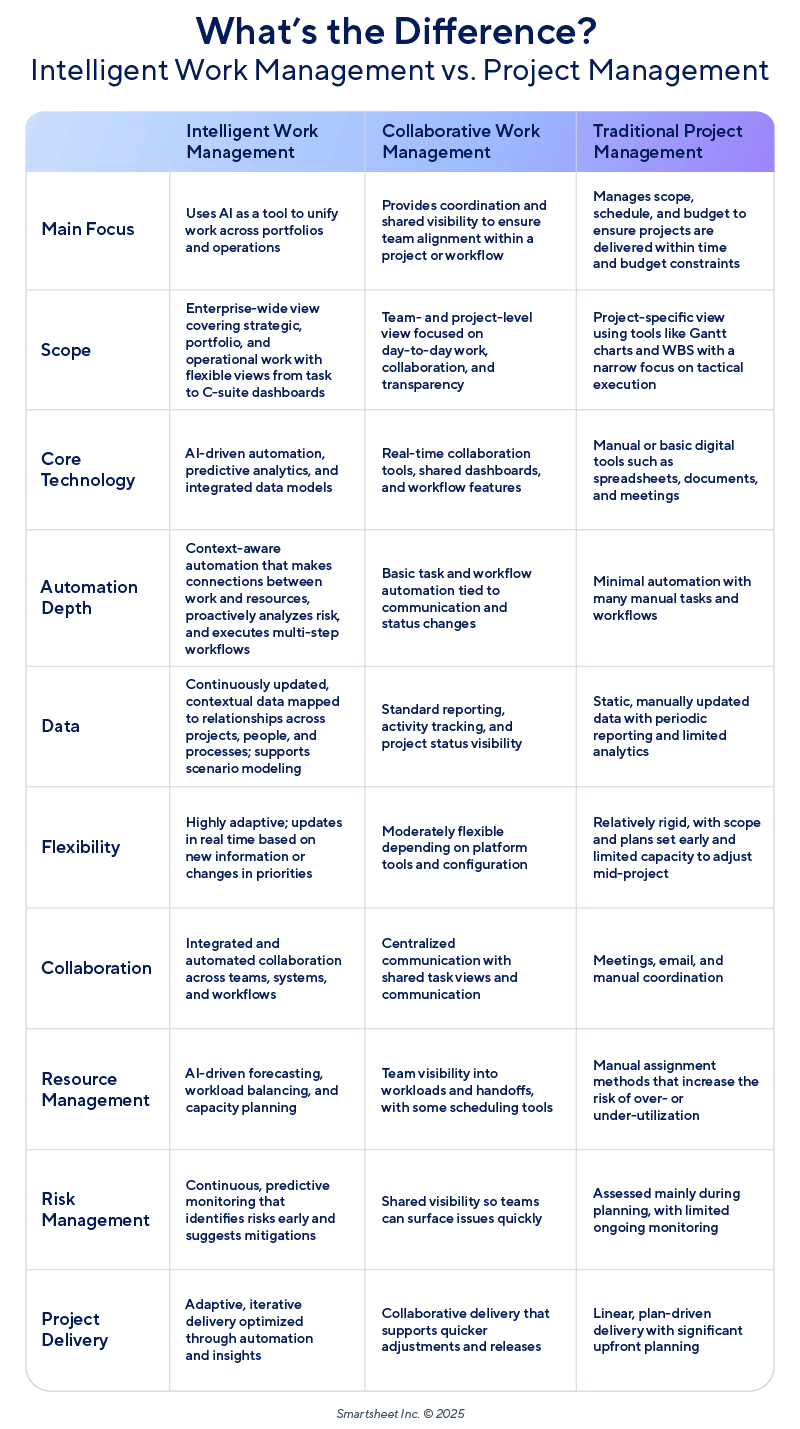
Intelligent work management is the next stage of delivery after collaborative work management. Traditional project management focuses on structure and control. Collaborative project management adds transparency and teamwork. Finally, intelligent work management focuses on orchestrating work seamlessly across people, systems, strategy, and technology.
The 2026 Project and Portfolio Management Priorities Report highlights that organizations must “move past simply adopting AI tools,”which creates significant trust gaps. The intelligent work management model can fill those gaps because it, “unifies people and technology to eliminate execution silos and accelerate strategic delivery.”
Here is a summary of how intelligent work management differs from the management approaches that came before it:
Intelligent Work Management vs. AI-Driven Project Management
The key difference between intelligent work management and AI-driven project management is scope. AI improves overall work management by improving individual projects. This can be through optimizing tasks and schedules, flagging risks, identifying bottlenecks, helping with resource allocation, providing summaries, and more.
“Most people think that adding AI to project management automatically transforms an organization. It doesn’t,” Timi Ogunjobi, a consultant and coordinator with the Project Management Institute, told Smartsheet. “AI improves project work, but intelligent work management transforms how all work across an organization is aligned, prioritized, executed, and continuously improved.”
The main difference, Ogunjobi says, is that “AI-driven PM helps you run projects better … intelligent work management helps you run the organization better.”
Imagine that a marketing team is in the middle of two major programs and submits a dozen new requests on top of that. Then, a separate but urgent compliance update arises. Ogunjobi explains how intelligent work management and AI-driven project management would work together in this example: An intelligent work management platform would evaluate these different timelines and the team’s capacity, commitments, priorities, risks, and dependencies to determine how work should be allocated. On top of that, AI might generate specific risk predictions, effort scores, and status updates. Together, the two levels of planning and dynamic work management help teams prioritize effectively and optimize their capacity and quality of work.
Why is Intelligent Work Management Important?
Intelligent work management is important because it transforms workflows by strengthening relationships between people and the information they need. It can improve execution accuracy, take on more proactive risk management, optimize resources, provide real-time visibility, and continuously self-improve.
The 2026 Project and Portfolio Management Priorities Report found that while 97 percent of PPM professionals surveyed were using or experimenting with AI, less than half were comfortable giving it responsibilities outside of human supervision. Organizations are still in the process of understanding how to adopt and deploy AI effectively. Intelligent work management is a better measure of this readiness, and success in deploying AI requires intelligent work management platforms.
Here are some benefits of intelligent work management:
More Accurate Execution: Basic automation can trigger the right workflows and prioritize and assign tasks to the right people, reducing coordination time. With intelligent work management, this happens on a continuous basis. AI tools reprioritize routes and work based on new context by reviewing data, capacity, dependencies, urgency, and goals.
Proactive Risk Management: AI identifies potential risks early, allowing teams to address issues before they escalate. Intelligent work management involves interpreting those risks to provide actionable insights that consider constraints in capacity and timeline.
Reliable Delivery: Continually adjusting plans based on live data makes timelines more dependable. Intelligent work management ensures that bottlenecks surface and are resolved early by connecting risks to current timelines.
Holistic Resource Optimization: Intelligent work management allocates people and skills across projects — not just within an individual workflow — by understanding efficient talent and resource use across an organization.
Continuous Visibility: AI can produce status updates, but intelligent work management should ensure continuous visibility. A continuously updated system reduces the need to sync information at meetings and ensures that teams and leadership are always aligned.
Efficient Workflow Design: AI can be used in workflow design to make specific steps more intelligent — like flagging bottlenecks, scheduling conflicts, or risks — but IWM can go further by redesigning processes and workflows based on new information and context.
Improved Governance: By dynamically connecting people, information, and decisions based on the broader context of work, intelligent work management enables more fluid collaboration while enforcing governance across workflows through automated policies, guardrails, and audit trails.
Examples of Intelligent Work Management
Examples of intelligent work management include guided actions that deliver context-aware recommendations, AI agents that act as collaborators, and smart automations that build and run complex workflows. These capabilities accelerate work by treating AI as an integrated partner rather than an external tool.
In a discussion from October 2025, Arora identified “disconnected tools and siloed data” as universal pain points in the way we work today. The future is not in adding more tools, she argues, but in “bringing your critical tools together.”
Here are some examples of how intelligent work management can look in practice:
Guided Actions: Intelligent work management involves hyper-personalized recommendations tailored to a specific organization’s needs, turning guidance into something dynamic and context-aware. Instead of merely surfacing insights, the system understands the organization’s priorities, constraints, and working patterns, shaping its recommendations accordingly.
For example, a director or manager might ask what the bottlenecks are in advance of a big launch, while an intelligent work management system would be able to produce a dashboard that factored in real capacity, cross-team dependencies, and organizational and cultural norms like approval routing.
Traditional AI might generate a report or highlight risks, but intelligent work management platforms should interpret the organization’s intent and operational context, and then help teams make decisions that reshape the end-to-end workflow.
Agents as Collaborators: With intelligent work management, AI becomes part of a working team — a “digital workforce” rather than a sidebar automation tool. Arora describes AI as an “always-on coworker.” It should constantly be learning and performing better with experience.
For example, at Smartsheet, the forthcoming Smart Agents feature serves less as a tool and more as a colleague, unlocking more capacity and amplifying impact. Smart Agents watch your project’s sheet data, track progress, update status, and suggest next steps or raise flags when something needs attention. While more traditional AI-as-tool features might require a prompt for every task, Smart Agents are always aware of context and are working in the background. They can help shift work from manual coordination to intelligent, context-aware collaboration. Learn more about Smartsheet AI.
Smarter Automations: Smarter automation means routine work gets handled automatically and consistently, but also that you are automating the right things. For example, the forthcoming Smart Flows feature from Smartsheet allows you to create complex automated workflows using natural language. It combines with different tools that perform specific functions, like analyzing sheet data and triggering new steps, to move projects forward without needing detailed, repeated requests. This makes teams more agile.
Siddharth Amaravadi, CTO of Antz AI, an AI agentic consulting firm that helps companies adopt AI effectively, notes that AI adoption is fast overtaking AI readiness. Many CXOs, he says, “are still unsure. Is this actually going to bring any value to us? … Everybody wants to get onto the bandwagon, like, ‘Hey, let’s just do it. Let’s show value, then let’s see if it’s actually worth investing time and effort into this thing.’”
One way to move beyond this early use case with AI is to shift its role from yet another siloed tool to a more proactive agent. Amaravadi gives a hypothetical example of a company that records and gathers a diverse set of tasks and requirements from clients. This company may have a scattered documentation process. “So I need an agent,” he says. This AI agent might keep track of evolving needs and new conversations, constantly updating and streamlining, and providing corrective notes and actions. “It is my single source of truth, and also my ‘go-to person,’” Amaravadi says. In this case, the tool is more like a project manager.
What are Intelligent Work Management Platforms?
Intelligent work management platforms are holistic systems that extend traditional and AI-powered project management tools. They create a unified system of work so that automations are more context-based. They offer real-time guidance and optimize resources at scale by gathering data continuously, rather than using a specific set of instructions or input.
These systems can proactively identify risks, make smart recommendations, remove bottlenecks, streamline repetitive processes, and improve decision-making. IWM systems are designed to be adaptive, learning from team behaviors and evolving business needs to provide tailored support rather than standardized processes.
Here are some examples of what intelligent work management platforms might do:
Create a Unified System: These platforms might pull data from sheets, dashboards, ERPs, and resource tools to create a big picture. This goes beyond using separate AI widgets. Smartsheet, for example, connects project plans, financials, and assignments into a single view so teams don’t have to stitch insights together manually.
Automate Workflows With Context: Instead of simple if-then input, intelligent platforms like Smartsheet Smart Flows build multi-step automations from natural-language instructions and adjust actions as project conditions change.
Provide Holistic Insights: Intelligent work management should mean using AI not just for specific, descriptive outputs but for overall enhancement. As Arora points out, the ideal AI teammate does not simply follow instructions; it continuously watches teams and individuals, understands what projects they work on, how they work, and their preferences and pain points. This insight allows for intelligent capabilities that anticipate schedule slippage or workload overload and make recommendations, all capabilities standalone AI tools lack.
Optimize Resource Allocation: Intelligent work management platforms might proactively suggest resource allocation based on availability, skills, and workload. Many standalone AI tools will simply generate a schedule, but IWM platforms perform a dynamic, system-level rebalancing.
Offer Actionable Guidance: Platforms should be able to spot bottlenecks early and surface next steps inside the project environment. For example, Smartsheet Smart Agents can prompt owners to make updates or flag risks, as well as recommend best practices.
Keep Teams and Stakeholders Aligned: Structure helps clarify relationships between people, information, and goals. For example, the Smartsheet Knowledge Graph shows who is working together and what sheets, dashboards, and projects they share. By using this context, it can update dependencies or recommend collaborators or relevant content. Instead of chasing updates or assembling reports by hand, everyone stays aligned because the platform interprets and communicates automatically.
Improve Constantly: By synthesizing insights from sheets and workflows across an organization, intelligent work management platforms can learn and improve constantly, helping leaders spot systemic inefficiencies. Because the intelligence is built into the platform, it learns across teams, not just from a single document or prompt.
AI in Work Management
AI in work management helps teams prioritize, forecast, resource, document, and analyze more efficiently. It uses data to guide decisions — making it a core capability of modern work management. As a result, leading organizations such as Uber, Microsoft, and Vinci have incorporated AI directly into their workflows.
Here are some common ways in which AI is crucial in work management:
Prioritization: AI skill and capacity analysis can help companies allocate resources efficiently and prevent burnout. Forecast: AI can use project data to reveal pain points, risks, bottlenecks, issues, or delays.
Budgeting: AI can score tasks by complexity and estimated time and effort to create realistic timelines.
Documentation: AI can generate project briefs and summaries to streamline communication.
Insights: By integrating data from multiple sources across a project, AI can reveal a team’s strengths, weaknesses, and general performance trends.
Several large companies have incorporated AI into their workflows. Here are some examples of how AI can look in real-life work management:
Vinci: Vinci Construction has used AI to automate contract analysis, optimize site logistics, improve safety using computer monitoring, analyze call-for-tender documents, track progress against plans with cameras on machinery, select materials, and automate engineering or design processes like crane foundations.
5 Tips for Implementing Intelligent Work Management
Successful intelligent work management starts with clear outcomes and strong data foundations. Organizations should focus on five core steps: define outcomes, audit your processes, reduce friction through smart governance, upskill teams for AI collaboration, and continuously measure and refine performance.
Implementing intelligent work management with a platform like Smartsheet shifts the focus from simply tracking tasks to actively optimizing execution. The platform unifies data, people, processes, and AI.
Here are some tips for implementing intelligent work management in your organization:
Define Clear Strategic Outcomes: Start by outlining the strategic business problems and measurable goals that intelligent work management is intended to solve. Focus on outcomes rather than tasks.
Audit Your Processes: Map out and standardize all your existing workflows, tools, processes, and data sources to ensure they are structured and accessible. Conduct a process inventory: What steps do your teams follow? Where is information stored, and in what format? What individual habits or tendencies might make automation difficult? What needs to be standardized before achieving optimal human-AI collaboration?
Minimize Friction: Do not force major organizational changes that create unnecessary friction. Choose systems that integrate with workflows that currently work. “I find it really attractive when a vendor doesn’t ask you to move away from what it is you’re already using, what it is you’re already comfortable with,” Arora notes. To further reduce friction and build trust, define governance for how AI will be used across teams transparently.
Provide Role-Specific Upskilling: Provide training for teams that focuses on working with and interpreting AI-generated insights effectively. Depending on their level of technical expertise, teams might learn how to manage AI assistants, design workflows, or maintain agent-based systems.
Measure and Refine: As with any new system, driving intelligent work management requires constant feedback and refinement. Assess how your systems are impacting performance, efficiency, and employee experience, continuously refine automation rules, and ensure the AI models remain accurate and adaptive over time.
Learn How Smartsheet’s Intelligent Work Management Solution Will Transform the Way You Work
Empower your people to go above and beyond with a flexible platform designed to match the needs of your team — and adapt as those needs change.
The Smartsheet platform makes it easy to plan, capture, manage, and report on work from anywhere, helping your team be more effective and get more done. Report on key metrics and get real-time visibility into work as it happens with roll-up reports, dashboards, and automated workflows built to keep your team connected and informed.
When teams have clarity into the work getting done, there’s no telling how much more they can accomplish in the same amount of time. Try Smartsheet for free, today.
Smartsheet is the Intelligent Work Management platform used by 85% of the Fortune 500. Here at Smartsheet, we believe our greatest power is unlocking the power of others.
Discover how 1,600+ project and portfolio management leaders are adapting to the AI era. Our 2026 PPM priorities report reveals why 97% use AI, yet confidence still lags — and how Intelligent Work Management bridges the gap to measurable business impact.