AI is reinventing project management as new capabilities regularly emerge. Explore the challenges and benefits of AI in work management, the best uses and tools, and the future of AI in project management. Plus, try our project manager AI skills toolkit, plus an AI RACI matrix.
AI has taken firm hold in project management. Project managers use predictive AI to reveal where schedules may slip or workloads could spike. They use generative tools to turn project details into communication. Early agentic AI are useful tools to monitor work and recommend next steps.
Summary Overview
AI is Shifting PMs into Systems Architects: AI is shifting project managers’ focus from task execution to system design. Project managers will have to construct the workflows, rules, and quality guardrails that AI enforces. Resilient operating systems that focus on governance, automation logic, and prompt precision will be more accurate measures of success than throughput. Project managers’ value will lie in maintaining process integrity, not managing individual tasks.
AI is Moving Away from Reactive “Firefighting”: Agentic AI transforms scope creep management by automating situational awareness and rapid replanning. Instead of firefighting delays, project managers gain a real-time decision cockpit that surfaces risks, analyzes drift, and generates multiple scenarios quickly. This shift moves managers from reactive data work to strategic steering.
These three types of AI show up in different ways. Predictive AI studies task progress, past patterns, and current capacity — using this information, it attempts to create models and forecasts of future conditions. It can warn you when a milestone is drifting or a contributor may be overloaded.
Generative AI greatly shortens the time that project managers spend producing reports. It can turn a week of task changes into a status report, summarize long comment threads or the factors causing schedule delays. Instead of stitching information together manually, PMs start with a draft they can refine.
AI in these areas is already widespread. According to the 2026 Smartsheet PPM Priorities Report, 97 percent of PPM professionals already use it for scheduling, risk visibility, and reporting, and 87 percent see it as an opportunity to transform the way they work.
Meanwhile, early agentic features, such as recommending next steps for a project, are still emerging in most PM tools. These features come with great promise, and also pose challenges.
Project managers equipped with AI can more easily forecast delays, create project summaries, and eliminate tedious hours of manual reporting. AI helps project managers see risks, make faster decisions, and keep projects moving even as plans and priorities change. These benefits help PMs focus on higher-value work requiring creative thinking and analysis rather than repetition.
These are some of the main benefits of incorporating AI into project management:
More Accurate Schedules: AI analyzes historical durations, team workloads, and interrelated tasks to forecast timelines and create realistic, accurate schedules. Doing this manually through research and data-gathering would take much longer, and factors could keep changing throughout the process.
Earlier Risk Detection: Predictive models scan tasks and patterns to reveal delays, bottlenecks, scope drift, and resource issues earlier than can be done manually, creating an early warning system.
Faster Responses: AI-equipped teams adjust plans more quickly in fast-moving environments. With 98% of surveyed PPM professionals saying they must reprioritize work due to business shifts, this benefit can be immense. AI-supported forecasts and summaries facilitate updated timelines and rebalanced workloads.
Easier Reporting: Generative AI can help managers produce stakeholder updates, weekly summaries, and data-informed portfolio insights. AI tools can also help present complex data in digestible forms so that all stakeholders can easily understand project health.
Smarter Resource Usage: AI spotlights overburdened team members, identifies availability, and recommends adjustments so PMs can keep workloads balanced throughout projects and portfolios.
Reduced Administrative Effort: Repetitive tasks like status updates, task assignments, documentation management and notetaking, as well as summary and report generation are much easier with the help of AI tools.
Stronger Portfolio Visibility: AI connects with data throughout projects, monitoring and tracking performance, analyzing information, and creating a big-picture overview on what to prioritize across an organization.
More Confident Scenarios: Using AI, project managers can formulate best-case, worst-case, and most-likely schedules or budgets so teams can review contingencies before committing.
Many platforms already enable these benefits, but the level of automation varies. Most tools offer strong assistive AI today, while higher-level predictive and agentic abilities are steadily expanding.
Already, well-structured AI can be a reliable administrative or research assistant — and it has the potential to do more for you over time as companies undergo AI digital transformation.
AI’s Challenges for Project Managers
AI introduces many challenges, from poor data hygiene to steep learning curves. The culture is still largely distrustful of AI. The technology is new enough that it is difficult to truly analyze and measure its influence. Most organizations are still figuring out AI’s best uses in a fast-changing environment.
Here’s an overview of the challenges that AI presents project managers:
Sloppy Data
This consistently arises as the top challenge. AI needs access to accurate schedules, resource data, and updates. When information lives in disconnected tools or is inconsistently maintained, AI outputs — forecasts, risks, summaries — become less reliable.
“Most teams feed AI ambiguous scopes, outdated timelines, inconsistent task information, and fuzzy ownership. With sloppy inputs, the outputs look like hallucinations, but the real issue is that the underlying system was never deterministic to begin with.” — Ari Meisel, author of The Art of Less Doing
This happened to Mark Friend, Director at Classroom365 and former Global VPN Project Manager at the British Council.
“We attempted to predict timeline risks or budget overages with AI. The AI tools did not work since the information they were trained on was rubbish. Project engineers do not work as data entry clerks; they will mark a task 50 percent complete when in reality it is 90 percent complete but being held up by a single cable. The AI is unable to decode this human situation.” — Mark Friend, Director at Classroom365, former Global VPN Project Manager at the British Council
To offset this problem, standardize how you handle task data before trying AI. Centralizing work in a single platform helps with consistent, up-to-date information.
Distrust
According to the 2026 Smartsheet PPM Priorities Report, less than half of PPM professionals say they trust AI enough to let it act independently. Teams are more comfortable letting AI draft content or flag issues, but they’re not ready for autonomous actions — updating dates, adjusting resources, or triggering escalations — without a person reviewing the change. To prepare the tool for its job, see how it does with a single, straightforward task like issue spotting. Did it flag the right things and provide useful input? Discuss its performance with your team to slowly build trust.
Difficulty Measuring Impact
Quantifying an AI tool’s performance can be tough amid a sea of information. Also, AI recommendations often come in the flow of work, which makes it harder to delineate AI’s contribution. To make this simpler, settle on one measurable use, such as lessening time spent on reporting.
Skills Development
PMs vary widely in comfort with AI. Some use it daily; others are uncertain. Without training, usage can lag. To train teams, compile useful prompts, risk templates, and encourage everyone to give them a shot. For more, see these two Smartsheet resources: an AI skills assessment and development toolkit and a guide to AI prompt writing for project management.
Improper Use of Tools
Teams often leap too quickly into AI, before knowing quite how they should use the tools, what are acceptable sources of data, or which decisions absolutely need to be made or supervised with human input.
“Teams deploy AI tools without establishing guardrails about what information the tools access, and the result becomes chaos. Project managers feed sensitive data, competitive pricing, and internal resource constraints into AI, and then watch those systems develop recommendations that sound intelligent but miss critical human judgment calls.” — Sain Rhodes, sales operations professional at Clever Offers
She says this also speaks to training: “The underlying problem runs deeper than security concerns — teams don’t know what questions to ask AI, so they treat it as an oracle instead of a specialized tool.” Decide what data is fair game, which actions require human sign-off, and when PMs should validate or override recommendations. Write a short “AI playbook.”
Tool Limitations
The best tools offer strong assistive capabilities (summaries, drafting, forecasting), but more advanced agentic features may be less mature, less standardized, or available only in early-access programs. These may require extensive experimentation: it might help to pilot agentic features within a small group before deciding whether your organization is ready to incorporate them into existing workflows.
AI makes project managers faster and more effective by forecasting schedules, flagging risks, drafting updates, and comparing scenarios. Most use cases today focus on assistive support. Early agents help PMs act sooner and stay ahead of problems.
Here are some of the top use cases of AI in project management:
Predictive Scheduling: Create a realistic schedule using AI that stays realistic as the project unfolds. AI can estimate task durations, map dependencies, check capacity, and recalculate when new information arrives.
Risk Detection: A project may be veering off track if there are telltale patterns in updates, task behavior, delays, and workload signals. “AI is extremely good at risk surfacing, especially the subtle kind humans ignore,” Meisel says. “I’ve seen AI detect schedule risk simply by reading status updates and noticing language drift (should, might, blocked, revisiting).”
Resource Assignment: The task and resource landscape is exceedingly complex and ever-changing, but AI takes it all in. “AI is better than people think at creating first-pass resource allocations,” Meisel shares. “Most PMs assume this is too nuanced, but AI will map skills to tasks, identify mismatches, and suggest load balancing in seconds — something that normally takes hours of spreadsheet wrestling.”
Resource Rebalancing: AI tools can assess when a contributor is overallocated or when there’s unused capacity, and then explain how to move around tasks or workloads. This helps PMs make the adjustments that an organization needs to keep projects on track while maintaining a healthy work culture.
Automated Reporting: Weekly updates, milestone summaries, portfolio reports, and other documentation that is infused with live data can be created and maintained much more easily with the help of AI. An AI tool will explain why a milestone is at risk, giving PMs context before they finalize an update. PMs can then turn a set of task changes into a stakeholder-ready message in seconds.
Scenario Tests: PMs can query AI to contrast options with “if/then” or best-case/worst-case scenarios. This use case can help project managers visualize and assess the stakes of all their options
Project Intake: Sort requests, assess effort, and underscore which items best match priorities and upcoming capacity. This information helps project managers make decisions about which projects to invest in and what should enter the pipeline.
Agentic Monitoring and Recommendations: Early agentic features can watch for drift in workloads, timelines, or dependencies. In response, they might prioritize a stalled task or notify a stakeholder, helping to ensure that corrective action is taken wherever needed before problems escalate.
Implementing AI Successfully in Project Management
Teams do best implementing AI when they make a plan and roll it out gradually. First, feed it the right data before integrating it with existing tools. Keep people in the loop to help interpret AI output. Run frequent checks and measure outcomes before scaling.
Follow these steps to implement AI into your project management workflows:
Pick a Pilot Case
Take a task that’s easy to compare against your team’s current process — perhaps drafting status updates, or flagging stalled tasks, or summarizing project notes. These experiments help teams see where AI genuinely improves value without disrupting delivery. They also provide useful data on what works and what doesn’t.
Clean Up Your Data
AI does well only when task information is accurate, timely, and structured consistently. So clean up your project details, whether they live in a spreadsheet or a PM tool. Standardize fields, naming conventions, and workflows to reduce confusion and make predictions more reliable. Even small improvements in data hygiene can improve the quality of AI-generated insights.
Keep People in the Workflow
Make sure there is human input on anything that affects dates, scope, money, or other big decisions. Human judgment helps interpret and train AI within the context of real projects. By staying closely involved, teams maintain accountability and can work on improving the quality of their AI.
Integrate AI Into Your Existing Tools
Try any built-in AI where your schedules, tasks, files, and updates already live. AI should work from the same information the team relies on. Adoption is likely to be better if teams don’t have to switch tools or keep data in multiple places. Microsoft Copilot and Google Gemini, for example, have extensive integrations with the entire Microsoft and Google ecosystems and beyond, allowing them to pull project data from connected systems.
Monitor Outputs and Refine AI Playbooks
Document examples of high-value output, like what a good AI-generated summary looks like, how to tweak a forecast, or how to utilize prompts. Keep records of “do’s” and “don’ts” to help train managers on how to manage the AI.
Measure One Outcome Before Expanding
Pick one metric. Consider time eliminated on reporting, fewer overdue tasks, fewer bottlenecks, or reduced rework. Measure the change, or progress, over a fixed amount of time; if there has been significant improvement, you can get ready to scale. Focusing on a single outcome makes it easier to have clear, measurable progress.
Expand Slowly to Higher-Value Use Cases
Once the basics are working — summaries, alerts, forecasts — you can move into scenario planning, capacity management, and early agent-style recommendations. These higher-value use cases are harder to execute with AI but provide more long-term benefits and build stakeholder trust.
Get an AI RACI Chart for Project Managers
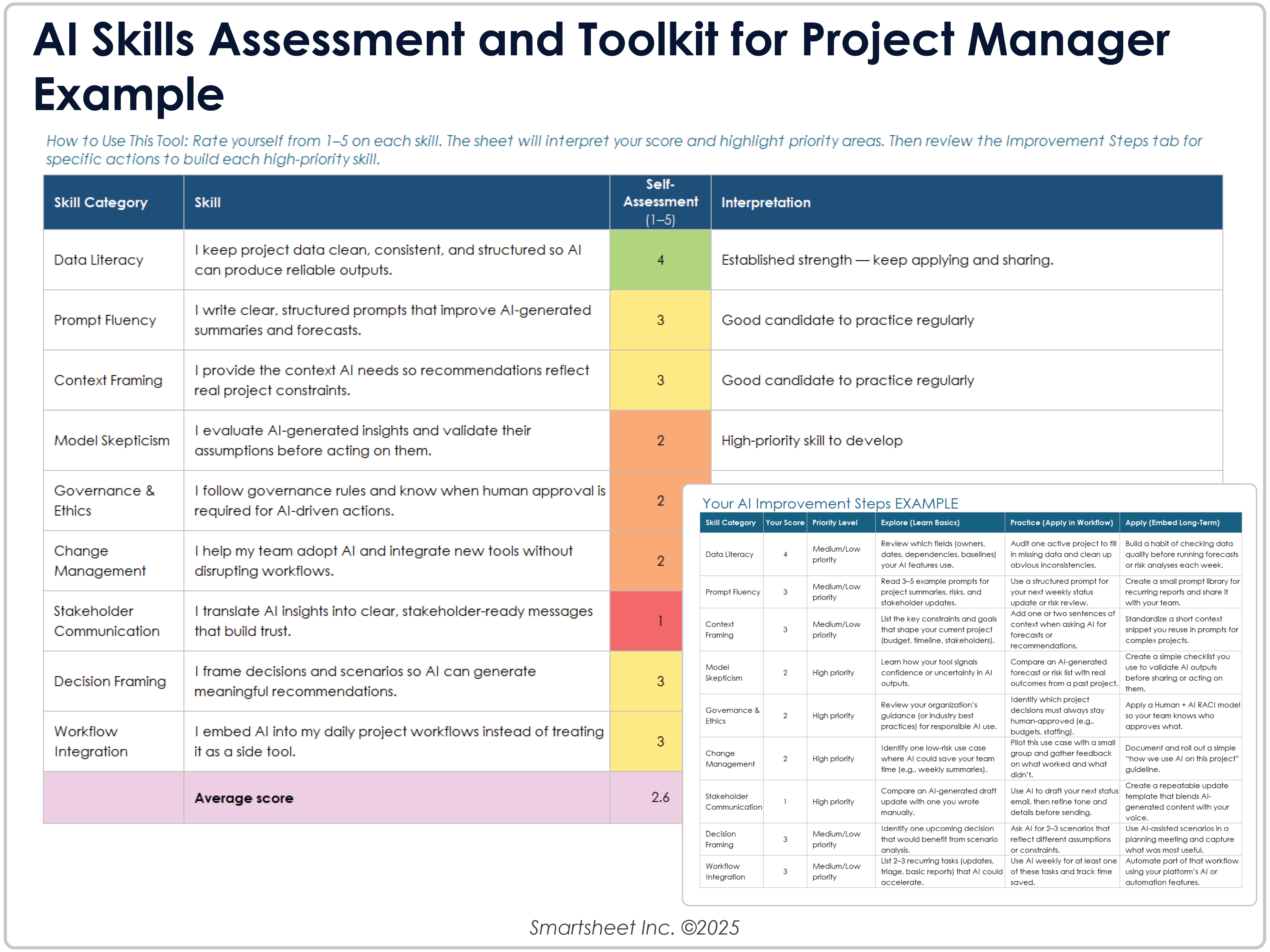
If you want to learn more skills for using and managing AI, the toolkit below provides a quick assessment and recommends next steps.
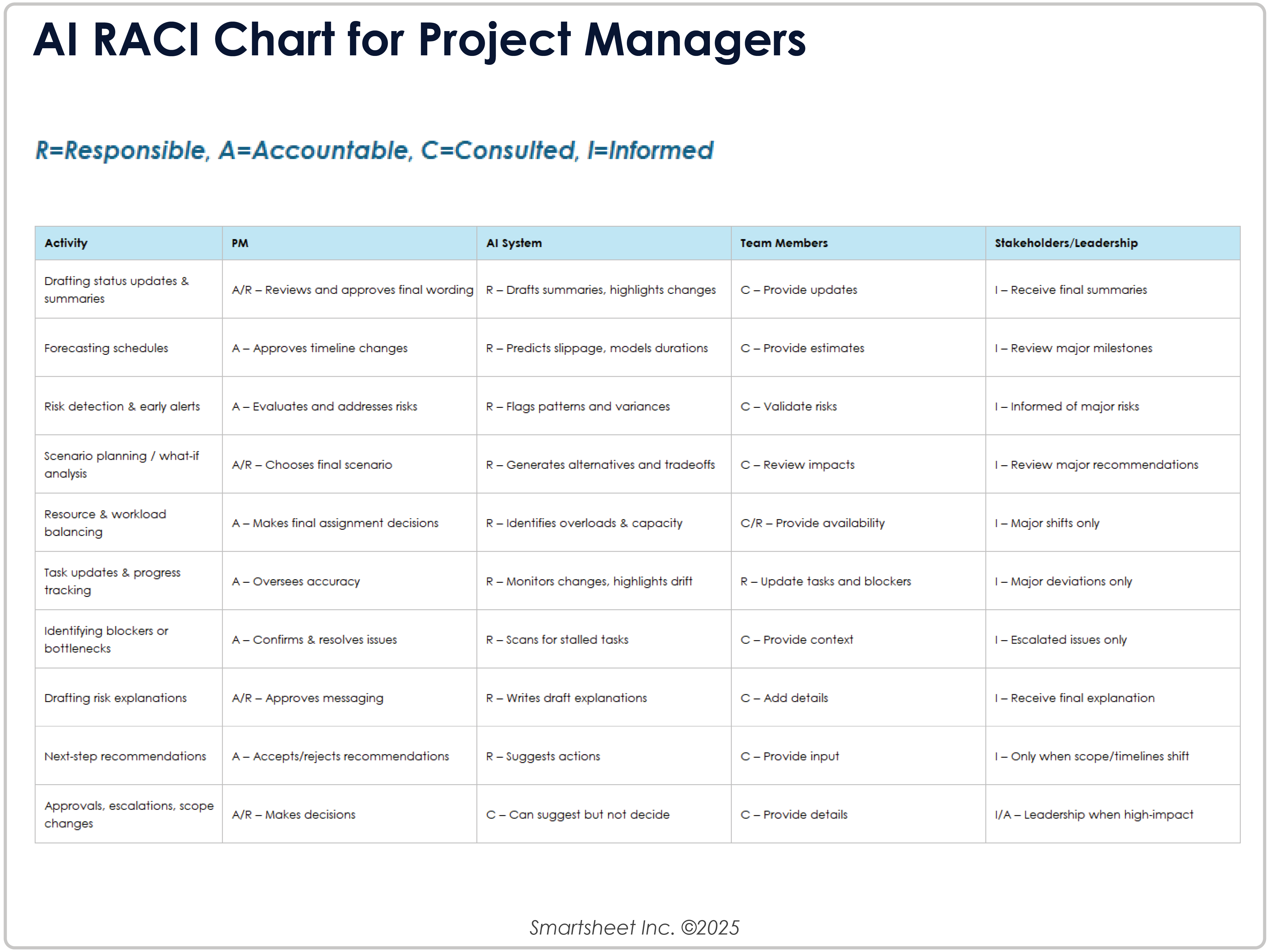
As AI increasingly enters project work, teams often ask who’s responsible for what. This RACI chart clarifies how project managers, AI tools, staff, and leaders each contribute. Use it as a quick reference when defining roles.
Switch to the next template tab, Your Development Steps, to see the steps tied to your scores. Each range includes practical actions — testing a prompt pattern, comparing scenarios, or reviewing an AI-generated update before a meeting.
AI Tools to Leverage for Project Management
There is a wide range of AI tools that can be leveraged for project management. You can choose from PM platforms with built-in AI to chat-based assistants and scenario-testing tools. Whatever you use, it’s best if you hook into centralized project data to lessen data hygiene issues.
Here’s a tool overview:
PM Platforms with Built-In AI: Most modern PM platforms include native AI with timeline forecasting, status summaries, and early risk signalings.
AI Assistants: Some systems with chat-based assistants can produce updates, rewrite task descriptions, summarize discussions, or explain why a task may be slipping. These helpers reduce administrative effort and help PMs more quickly prepare stakeholder-ready communication. PMI Infinity and PSOhub Copilot are examples of “always-on” AI assistants that surface context from work, deliver alerts or draw research on demand, and flag issues so project managers can respond sooner. Human direction guides their outputs and turns their insights into action, and they rely on feedback and responses to refine their recommendations.
Scenario-Testing Tools: Envision best-case, worst-case, and most-likely outcomes before changing a schedule or reallocating work. Comparing a few quick scenarios helps PMs evaluate tradeoffs.
Automation Tools: Distributing requests, sending reminders, updating fields, and escalating stalled tasks can all be handled with these tools. See our workflow automation guide.
Data Integration Tools: Project schedules, discussions, documents, and resource information should be together. Tools that unify these elements, or at least connect them cleanly, produce smarter forecasting and summaries.
Smartsheet is moving toward this more connected model. Its intelligent work management approach unifies people, data, and artificial intelligence for consistent insights and sensible recommendations.
The Future of AI in Project Management
The role of AI in project management is shifting from simple assistance to more proactive support. Future tools are expected to add context, anticipate ripple effects, take on routine adjustments, and support coordinated next steps. These features are all to help you keep ahead of issues and new priorities.
Experts expect to see:
More Proactive Recommendations: Emerging agent-style features are expected to watch for workload drift, dependency changes, and stalled tasks, then recommend actions a PM can review or approve. These systems will help PMs respond faster in environments where priorities shift often.
Scope Creep Management: “Over the next 12 to 24 months, agent-style AI will change how project managers handle scope creep,” Rhodes says. “AI agents that flag emerging risks and give multiple replanning scenarios will fundamentally shift PM work from reactive firefighting to strategic steering. A PM can review three AI-generated scenarios in five minutes instead of spending two days building spreadsheets themselves.”
Stronger Decision Support: Future tools will likely model changes throughout schedules with far less effort. AI will compare several scenarios at once, highlight the tradeoffs, and recommend the best option. This makes replanning more reliable.
Tighter Connections: AI works best when it has a full view of what teams are doing. As tasks, conversations, documents, resource information, and other project data become better connected, AI should produce clearer forecasts, better summaries, and more trustworthy recommendations. Platforms moving toward unified environments with intelligent work management will experience this progress more quickly.
Stricter Governance: Organizations will likely stress transparency, auditability, and oversight. PMs will review AI-generated actions, track why recommendations were made, and decide on independent automations.
New Skills for Project Managers: PMs won’t need to become data scientists, but they should be experts in reviewing AI output, refining prompts, interpreting forecasts, and explaining risks or tradeoffs.
PMs as Architects: “The PM’s job is moving from traffic controller to systems architect,” Meisel says. “Instead of chasing updates and nudging people for status, PMs will design the workflows, automations, and quality constraints that AI continuously enforces.” He adds: “The PM of the near future won’t ask, ‘What’s the status?’ They’ll ask, ‘Where is the system degrading, and what rule needs redesigning?’ They stop managing tasks altogether and start reshaping the operating system the tasks run inside.”
AI Skills Assessment and Toolkit for Project Managers
This toolkit helps you take stock of how you’re using AI now and recommends how to hone those skills. The assessment and next-step recommendations give PMs quick, practical ideas for improving forecasting, reporting, and day-to-day AI use.
This skills assessment categorizes and assesses the skills required for project managers adopting and managing AI. Use it to score your readiness. Scan the list of AI-related skills and score each one quickly and honestly. This assessment gives you a snapshot of your comfort level with reviewing AI summaries, checking forecasts, writing prompts, and validating recommendations. When you’re done, your totals show where you’re strong and where you may want more support.
Switch to the next template tab, Improvement Skills, to see the steps tied to your scores. Each range includes practical actions — testing a prompt pattern, comparing scenarios, or reviewing an AI-generated update before a meeting.
Transform Your Organization’s Intelligent Work Management Process with Smartsheet for Project Management
From simple task management and project planning to complex resource and portfolio management, Smartsheet helps you improve collaboration and increase work velocity -- empowering you to get more done.
The Smartsheet platform makes it easy to plan, capture, manage, and report on work from anywhere, helping your team be more effective and get more done. Report on key metrics and get real-time visibility into work as it happens with roll-up reports, dashboards, and automated workflows built to keep your team connected and informed.
When teams have clarity into the work getting done, there’s no telling how much more they can accomplish in the same amount of time. Try Smartsheet for free, today.
FAQS on AI for Project Managers
AI improves project planning by reviewing task durations, historical patterns, contributor capacity, and interdependencies to forecast when schedules are likely to slip. It can surface risks earlier, recommend workload or timeline adjustments, and give PMs visibility into what’s changing.
AI does best with project data that has consistently structured task details, dates, resourcing, and the latest status changes. It also benefits from clear dependencies, ownership fields, and workflows. Clean data is essential for AI recommendations to be valuable. Historical data is also crucial to make recommendations more reliable over time.
AI replacing project managers in the future is a genuine concern. According to the 2026 Smartsheet PPM Priorities Report, about 74 percent of surveyed PPM professionals were worried that their roles could be replaced by AI within five years. But it’s important to remember that while AI writes messages, summarizes updates, and explains risks, it can’t handle relationship-driven communication, nuanced priorities, or high-risk decisions requiring judgment.
To measure AI’s ROI within the context of a project, select an everyday work metric to track, such as a reduction in overdue tasks or fewer bottlenecks. Compare a short period before and after using AI for that task. Measurable improvements help teams decide where to expand AI next.
Strong PMs develop skills that help them review and hone AI output: checking summaries for accuracy, writing clear prompts, interpreting forecasts, and understanding tradeoffs in scenarios. Project managers should also be able to explain AI-generated risks or recommendations to stakeholders.