Article
Connectivity compounds intelligence: How Smartsheet unlocks organizational AI with Microsoft Copilot Cowork
The most consequential work in any enterprise crosses every team and every system. Real-time visibility across all of it is what separates results from chaos. Smartsheet believes enterprise AI should meet people where they work, grounded in data that already exists.
Smartsheet is introducing a dedicated Microsoft Copilot Cowork connector built on the Model Context Protocol (MCP), designed for the way enterprise teams already work.
Microsoft 365 Copilot Chat is the AI assistant embedded across Microsoft 365 — Teams, Outlook, Word, Excel, PowerPoint and Microsoft 365 apps. Copilot Cowork is the agentic layer of Microsoft 365 Copilot: you describe an outcome, and it plans and executes multi-step work across your apps, pausing for your approval before it sends, schedules, or updates anything. The connector is available by default, under the governance and controls enterprise adoption requires. Cowork users add the Smartsheet connector to their Cowork environment, open a new task, and start using it in chat.
Ask Copilot Cowork a question about your projects, and it answers with live data from Smartsheet: no tab-switching, no copy-paste, no manual assembly. The time your team spends moving information between tools becomes time spent using it. And for teams that want to go further, the Smartsheet MCP connector is also available in Copilot Studio, Microsoft’s enterprise platform to build, configure, govern, and deploy agents, so IT and developers can build custom agents that put that live data to work across the organization.
“Enterprise AI is only as good as the context it can reach. Smartsheet has always been where the real work lives — the programs, the dependencies, the governance. Our MCP Connector brings that depth directly into the Microsoft 365 Copilot ecosystem. That's AI that earns its keep.”
— Drew Garner, Chief AI Officer, Smartsheet
What this will change for your team
Before: Copilot drafts your status update. You open Smartsheet, filter the sheet, copy the relevant rows, paste them into the chat, and ask Copilot to incorporate them. The AI does the writing; you do the data work.
After: You ask Copilot Cowork for a status update. It calls the Smartsheet MCP server, pulls the live rows, writes the brief with real data, and sends it from Outlook — all in the same conversation. Every fact came from your actual sheet, not from memory or a paste.
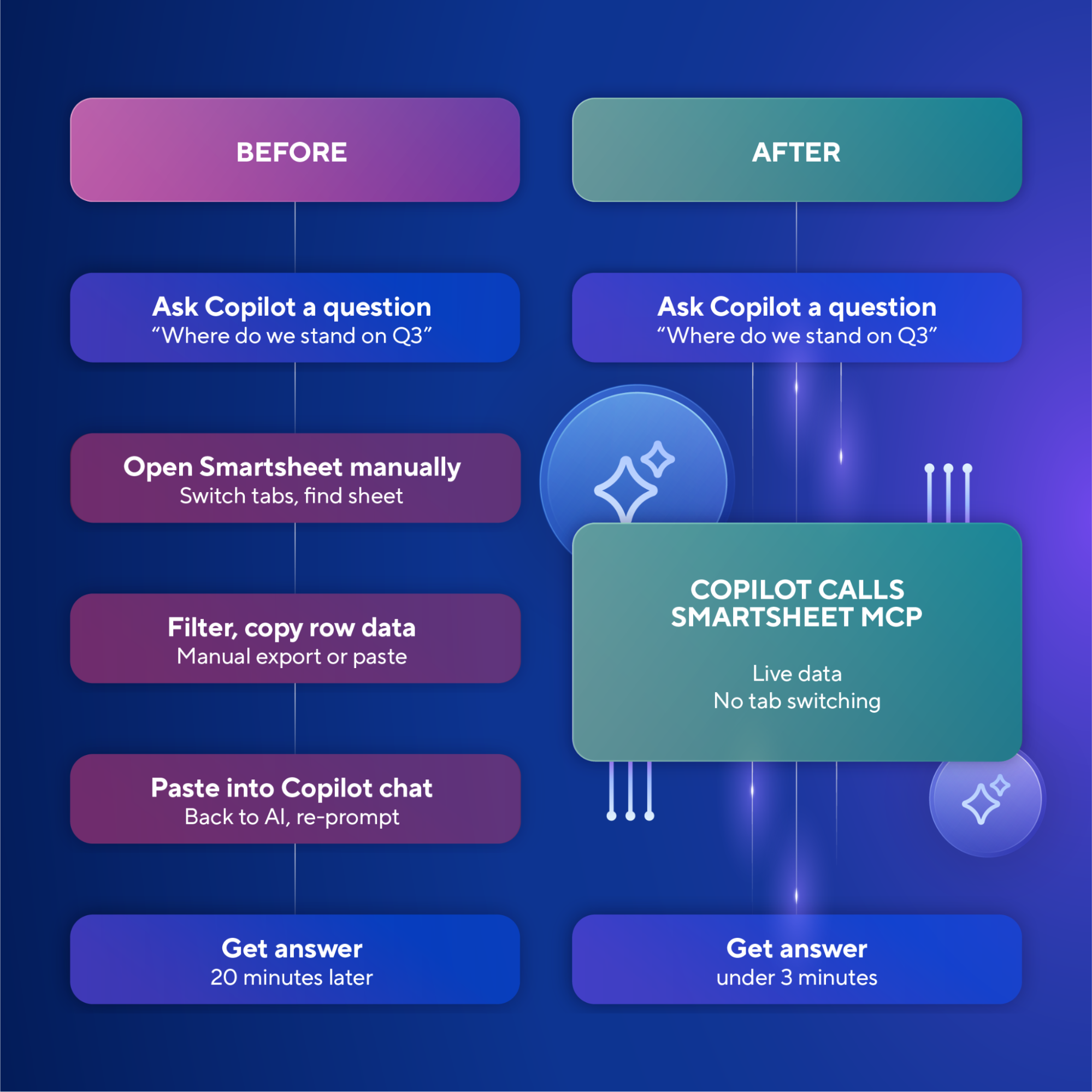
The Model Context Protocol is an open standard that lets AI models call external systems as tools, securely and in real time, without the user moving data manually. The Smartsheet MCP connector supports both on-demand tool calls and proactive agent actions. Most MCP integrations only do the former.
What it looks like in practice
The Monday brief: from question to executive update in three minutes
It's 8:47 AM. You open the Copilot app and ask Cowork: "Show me every project where completion is below 50% and the deadline falls within the next two weeks."
Cowork queries across your sheets and returns a ranked list: not a screenshot, not a CSV, but a structured answer you can act on in the same conversation. You ask for a follow-up: "Draft a status update for the executive team covering these three projects." Cowork has the row data, knows the owners, and writes the brief. You review, adjust the tone, send from Outlook — all without leaving the thread. What used to take twenty minutes of tab-switching took three.
Meeting to milestone: action items in Smartsheet before the call ends
A project kickoff ends in Teams. Cowork has the transcript. It identifies five action items, cross-references the owners against the project sheet, and surfaces a prompt: "I found 5 action items from this call. Want me to add them as rows to the Q4 Launch project?"
One click. Rows created, owners assigned, due dates populated from what was discussed. The sheet reflects reality before the recording is even processed.
The proactive risk flag: insights delivered before you knew to ask
This use case is only possible with a dedicated connector. Cowork can surface insights on a schedule, proactively, with no prompt required.
At 9 AM Wednesday, before you've opened Smartsheet, Cowork sends a digest in Teams: "Three tasks assigned to Jordan are all due Friday. One is still Not Started. Jordan has back-to-back meetings today and tomorrow — 6 hours total. You may want to reassign or push the deadline on the landing page copy task."
Live Smartsheet data, correlated with Microsoft 365 calendar context, delivered as a structured recommendation with a one-click action to update the row. AI orchestrates enterprise work, not just answers questions about it.
Going further with Copilot Studio
The scenarios above describe what Cowork does out of the box. Copilot Studio is where organizations go further.
With the Smartsheet MCP connector as a native tool in Copilot Studio, a developer or IT admin can compose agents that would have required months of custom engineering two years ago. A Project Health Agent built by your PMO team can monitor a portfolio of sheets, identify slipped statuses or missed deadlines, post a digest to a Teams channel based on scheduled time or a triggering activity, and write back — updating a row, triggering a Smartsheet automation, or escalating a priority. Built in an afternoon, not a sprint.
How it's built
The Smartsheet MCP server gives Cowork direct access to core Smartsheet capabilities like reading and writing rows, managing attachments, triggering automations, and querying reports. Every action is structured, typed, and traceable back to the user who authorized it. Compliance is built into the integration layer, not bolted on.
The Smartsheet MCP server is also deliberately designed for token efficiency. Rather than returning full sheet dumps or unstructured data, it exposes targeted, structured endpoints — so AI models retrieve only what's needed for the task at hand. That precision reduces latency, lowers token consumption, and keeps AI workflows cost-effective at scale. It's not just an integration that works. It's one that pays off.
The connector requires no additional infrastructure for organizations already using Cowork and Smartsheet. Once the connector is added to a user's Cowork environment, they can start using it in a new task.
Every action happens under the user's own identity, with access governed through OAuth 2.0 brokered by Microsoft Entra ID. Cowork only sees and modifies what that user has permission to access in Smartsheet. Tenant isolation is enforced at the connector layer. Those guardrails are built into the integration layer from the start, and admins control the rest: whether the connector is on, and in Copilot Studio, which tools an agent can use.
The strategic picture
The future of enterprise AI isn't a single model that knows everything. It's AI that knows where to look, what to ask, and how to act across the systems where work actually happens.
Smartsheet’s integration with Cowork and Copilot Studio brings the intelligence and the operational ground truth to teams across your company: embedded across every surface where enterprise work is happening and closing the gap between where decisions are made and where work gets done.
For individual contributors, that means less time assembling context. For teams, decisions grounded in live data instead of last week's export. For the organization, AI that operates at the level of institutional intelligence, embedded in how work actually gets done.
Get started
For setup instructions and prerequisites:
For sample prompts and use cases once you're connected:
FAQ
The Smartsheet MCP connector is a dedicated integration that gives Microsoft Copilot Cowork direct, real-time access to your Smartsheet data. Built on the Model Context Protocol (MCP) — an open standard for connecting AI models to external systems — the connector lets Cowork read rows, write back updates, trigger automations, and surface proactive insights across Microsoft 365 without any manual data export. It's built for project managers, PMO leaders, and individual contributors who work across Smartsheet and Microsoft 365 daily.
No. The connector is available by default. As a Cowork user, you select the connector to add it to your Cowork environment, then open a new task and start using it in chat.
Copilot Studio is the enterprise platform to build, configure, and deploy agents, workflows, and tools that transform business processes with AI. In Copilot Studio, admins add the Smartsheet MCP connector as a tool, choose which Smartsheet tools the agent can use, and publish the agent to their organization. From there, teams can build custom agents such as portfolio monitors, automated digests, and write-back workflows.
MCP is an open standard that lets AI models securely call external systems as tools in real time, without the user moving data manually. Think of it as a structured API layer between an AI agent and the services it needs to act on — enabling live reads, writes, and automations in a single conversation thread.
The out-of-box connector is built for project managers, PMO leaders, and individual contributors who work across Smartsheet and Microsoft 365 daily. IT and Copilot Studio developers can go further: the Smartsheet MCP connector is available as a native tool in Copilot Studio, enabling custom agents for portfolio monitoring, automated digests, and write-back workflows — without custom engineering.